
PROJECT - 02
Product Design · Live Captioning
Tally
Coordinate a live captation in real time
ROLE
Solo · E2E
TEAM
PO · PM · Dev
DURATION
~1 month
DELIVERABLE
In production
TYPE
Real-time terrain
The cameraman was supposed to carry a live tablet. A single conversation was enough to change the target.


PROJECT - 02
Product Design · Live Captioning
Tally
Coordinate a live captation in real time
ROLE
Solo · E2E
TEAM
PO · PM · Dev
DURATION
~1 month
DELIVERABLE
In production
TYPE
Real-time terrain
The cameraman was supposed to carry a live tablet. A single conversation was enough to change the target.
PROJECT - 02
Product Design · Live Captioning
Tally
Coordinate a live captation in real time
ROLE
Solo · E2E
TEAM
PO · PM · Dev
DURATION
~1 month
DELIVERABLE
In production
TYPE
Real-time terrain
The cameraman was supposed to carry a live tablet. A single conversation was enough to change the target.
PROJECT - 02
Product Design · Live Captioning
Tally
Coordinate a live captation in real time
ROLE
Solo · E2E
TEAM
PO · PM · Dev
DURATION
~1 month
TYPE
Human-AI Interface
DELIVERABLE
In production
The cameraman was supposed to carry a live tablet. A single conversation was enough to change the target.
Results
Results
"It brings a breath of fresh air compared to the tools we use today."
Product Owner, final presentation
The interface is well received in the final presentation, as confirmed by the product owner. A stronger signal: having shifted the product target before a single screen even existed. The lead developer questions the clock synchronization, moving beyond polite feedback. An external designer consulted on the matter validates it without reservation.
The stage manager, without having seen the final mockups, verbally approves the synchronization cue, the navigation, and the double alert for the forgotten plan. Deliverable validated by PO, PM, and dev, and successfully deployed to production.
"It brings a breath of fresh air compared to the tools we use today."
Product Owner, final presentation
The interface is well received in the final presentation, as confirmed by the product owner. A stronger signal: having shifted the product target before a single screen even existed. The lead developer questions the clock synchronization, moving beyond polite feedback. An external designer consulted on the matter validates it without reservation.
The stage manager, without having seen the final mockups, verbally approves the synchronization cue, the navigation, and the double alert for the forgotten plan. Deliverable validated by PO, PM, and dev, and successfully deployed to production.
"It brings a breath of fresh air compared to the tools we use today."
Product Owner, final presentation
The interface is well received in the final presentation, as confirmed by the product owner. A stronger signal: having shifted the product target before a single screen even existed. The lead developer questions the clock synchronization, moving beyond polite feedback. An external designer consulted on the matter validates it without reservation.
The stage manager, without having seen the final mockups, verbally approves the synchronization cue, the navigation, and the double alert for the forgotten plan. Deliverable validated by PO, PM, and dev, and successfully deployed to production.
15-20%
Estimated reduction in reporting errors
What structured data entry enables
Before TALLY, the site manager recorded their observations in a single, standard Word template, regardless of the type of operation—resulting in too many fields that weren't always relevant. TALLY adapts this guided-field approach to the specific level of granularity needed (zone or plan), with an optional comment section for edge cases. Industry-wide, guided data entry reduces these types of errors by 15 to 20% compared to a generic form.
The reconciliation takes place at the time of upload, without subsequent reconstitution.
15-20%
Estimated reduction in reporting errors
Structured navigation, sequential processing; saves time
Before TALLY, the site manager recorded their observations in a single, standard Word template, regardless of the type of operation—resulting in too many fields that weren't always relevant. TALLY adapts this guided-field approach to the specific level of granularity needed (zone or plan), with an optional comment section for edge cases. Industry-wide, guided data entry reduces these types of errors by 15 to 20% compared to a generic form.
The reconciliation takes place at the time of upload, without subsequent reconstitution.
15-20%
Estimated reduction in reporting errors
What structured data entry enables
Before TALLY, the site manager recorded their observations in a single, standard Word template, regardless of the type of operation—resulting in too many fields that weren't always relevant. TALLY adapts this guided-field approach to the specific level of granularity needed (zone or plan), with an optional comment section for edge cases. Industry-wide, guided data entry reduces these types of errors by 15 to 20% compared to a generic form.
The reconciliation takes place at the time of upload, without subsequent reconstitution.
Business context
Business context
The coordination of a live recording
Framing and sound guide a broadcaster's editing and airing decisions. A studio specialized in live event capture delivers a coverage report based on these elements. In parallel with the live mix managed in the control room, each camera also records a dedicated feed for post-event editing: TALLY manages this field coordination. Imprecise coverage can compromise editing decisions.

The coordination of a live recording
Framing and sound guide a broadcaster's editing and airing decisions. A studio specialized in live event capture delivers a coverage report based on these elements. In parallel with the live mix managed in the control room, each camera also records a dedicated feed for post-event editing: TALLY manages this field coordination. Imprecise coverage can compromise editing decisions.
The coordination of a live recording
Framing and sound guide a broadcaster's editing and airing decisions. A studio specialized in live event capture delivers a coverage report based on these elements. In parallel with the live mix managed in the control room, each camera also records a dedicated feed for post-event editing: TALLY manages this field coordination. Imprecise coverage can compromise editing decisions.
Issue
Issue
"The link between the plan and the zone is approximate."
What the estate manager was experiencing
During a live broadcast, the technical director documents framing and sound while remotely guiding a camera operator, followed by camera and audio tracking. They manage video return, continuous audio, and field coordination, using only a paper roadmap as an interface. In the field, positions are signaled by gestures or physical landmarks, adding to the workload for a connection that remains approximate. The final association between the take and the shot is reconstructed from memory upon return.
"The link between the plan and the zone is approximate."
What the estate manager was experiencing
During a live broadcast, the technical director documents framing and sound while remotely guiding a camera operator, followed by camera and audio tracking. They manage video return, continuous audio, and field coordination, using only a paper roadmap as an interface. In the field, positions are signaled by gestures or physical landmarks, adding to the workload for a connection that remains approximate. The final association between the take and the shot is reconstructed from memory upon return.
"The link between the plan and the zone is approximate."
What the estate manager was experiencing
The analyst arrived at a raw gallery: no sequences, no distinction between verified and untreated, no indicators. Errors were concentrated on boundary conditions (micro-fouling, degraded coating). Correcting a misclassified image meant searching blindly.
Approach
Approach
Two interviews, one method
Interviews with the manager structure the validation process: an initial scoping meeting and a second post-wireframe confirmation meeting, held one-on-one without mockups on screen to limit anchoring bias. This is complemented by an informal review conducted by a designer not assigned to the project.
Two interviews, one method
Interviews with the manager structure the validation process: an initial scoping meeting and a second post-wireframe confirmation meeting, held one-on-one without mockups on screen to limit anchoring bias. This is complemented by an informal review conducted by a designer not assigned to the project.
01
Conviction
From the very start of project scoping, the PM was convinced that the camera operator should be equipped with a tablet to document the live shoot. The idea seemed logical: they are the one capturing the close-up shots, unlike the floor manager who directs from a distance.
An obvious truth, but only on the surface.
01
Conviction
From the very start of project scoping, the PM was convinced that the camera operator should be equipped with a tablet to document the live shoot. The idea seemed logical: they are the one capturing the close-up shots, unlike the floor manager who directs from a distance.
An obvious truth, but only on the surface.
01
Conviction
From the very start of project scoping, the PM was convinced that the camera operator should be equipped with a tablet to document the live shoot. The idea seemed logical: they are the one capturing the close-up shots, unlike the floor manager who directs from a distance.
An obvious truth, but only on the surface.
02
Block
Before designing a single screen, consulting an actual stage manager becomes non-negotiable, even when faced with reasonable intuition. The PO rules: the risk is not losing time, but designing for the wrong person. All technical choices are suspended until the first field interview.
It is better to verify than to guess.
02
Block
Before designing a single screen, consulting an actual stage manager becomes non-negotiable, even when faced with reasonable intuition. The PO rules: the risk is not losing time, but designing for the wrong person. All technical choices are suspended until the first field interview.
It is better to verify than to guess.
02
Block
Before designing a single screen, consulting an actual stage manager becomes non-negotiable, even when faced with reasonable intuition. The PO rules: the risk is not losing time, but designing for the wrong person. All technical choices are suspended until the first field interview.
It is better to verify than to guess.
03
Verbatim
During the first interview, the PM hears the stage manager's immediate response: in the field, the camera operator already has their hands full with the camera and their mind focused on following audio instructions. Adding another task for them would be unmanageable. A direct, straightforward answer.
"Adding another task to their workload would be unmanageable."
03
Verbatim
During the first interview, the PM hears the stage manager's immediate response: in the field, the camera operator already has their hands full with the camera and their mind focused on following audio instructions. Adding another task for them would be unmanageable. A direct, straightforward answer.
"Adding another task to their workload would be unmanageable."
03
Verbatim
During the first interview, the PM hears the stage manager's immediate response: in the field, the camera operator already has their hands full with the camera and their mind focused on following audio instructions. Adding another task for them would be unmanageable. A direct, straightforward answer.
"Adding another task to their workload would be unmanageable."
04
Pivot
The project’s target audience shifts before a single screen is even created. It is no longer the camera operator who needs to be equipped, but the floor manager—the person who coordinates all the cameras and bears the sole responsibility of monitoring. The suite is designed with them in mind.
The stage manager, the real target.
04
Pivot
The project’s target audience shifts before a single screen is even created. It is no longer the camera operator who needs to be equipped, but the floor manager—the person who coordinates all the cameras and bears the sole responsibility of monitoring. The suite is designed with them in mind.
The stage manager, the real target.
04
Pivot
The project’s target audience shifts before a single screen is even created. It is no longer the camera operator who needs to be equipped, but the floor manager—the person who coordinates all the cameras and bears the sole responsibility of monitoring. The suite is designed with them in mind.
The stage manager, the real target.
Decisions
Decisions
The journey, decision by decision
Before TALLY, preparing a live broadcast meant listing zones and shots on a paper roadmap: a long, tedious process that required reading through the entire document to double-check plans. The field coverage screen mirrors the visual layout of the preparation screen, making pre-selected elements instantly recognizable on site.
Less mental load during the live broadcast, as everything has already been decided beforehand.
The journey, decision by decision
Before TALLY, preparing a live broadcast meant listing zones and shots on a paper roadmap: a long, tedious process that required reading through the entire document to double-check plans. The field coverage screen mirrors the visual layout of the preparation screen, making pre-selected elements instantly recognizable on site.
Less mental load during the live broadcast, as everything has already been decided beforehand.
Feature
Show Setup
A 3-step wizard followed by a review screen. Selecting areas and plans beforehand replaces the paper roadmap and provides a familiar reference point on site.
Tablet-first
Wizard
Feature
Show Setup
A 3-step wizard followed by a review screen. Selecting areas and plans beforehand replaces the paper roadmap and provides a familiar reference point on site.
Tablet-first
Wizard
STAGE FLOW
1
Context: Location · Broadcaster · Client
2
Schedule: Event Type · Details · Camera Crew
3
Coverage: Selection of zones and plans to cover
4
Review: Summary, return to editing available by step
STAGE FLOW
1
Context: Location · Broadcaster · Client
2
Schedule: Event Type · Details · Camera Crew
3
Coverage: Selection of zones and plans to cover
4
Review: Summary, return to editing available by step

3


1
2
4
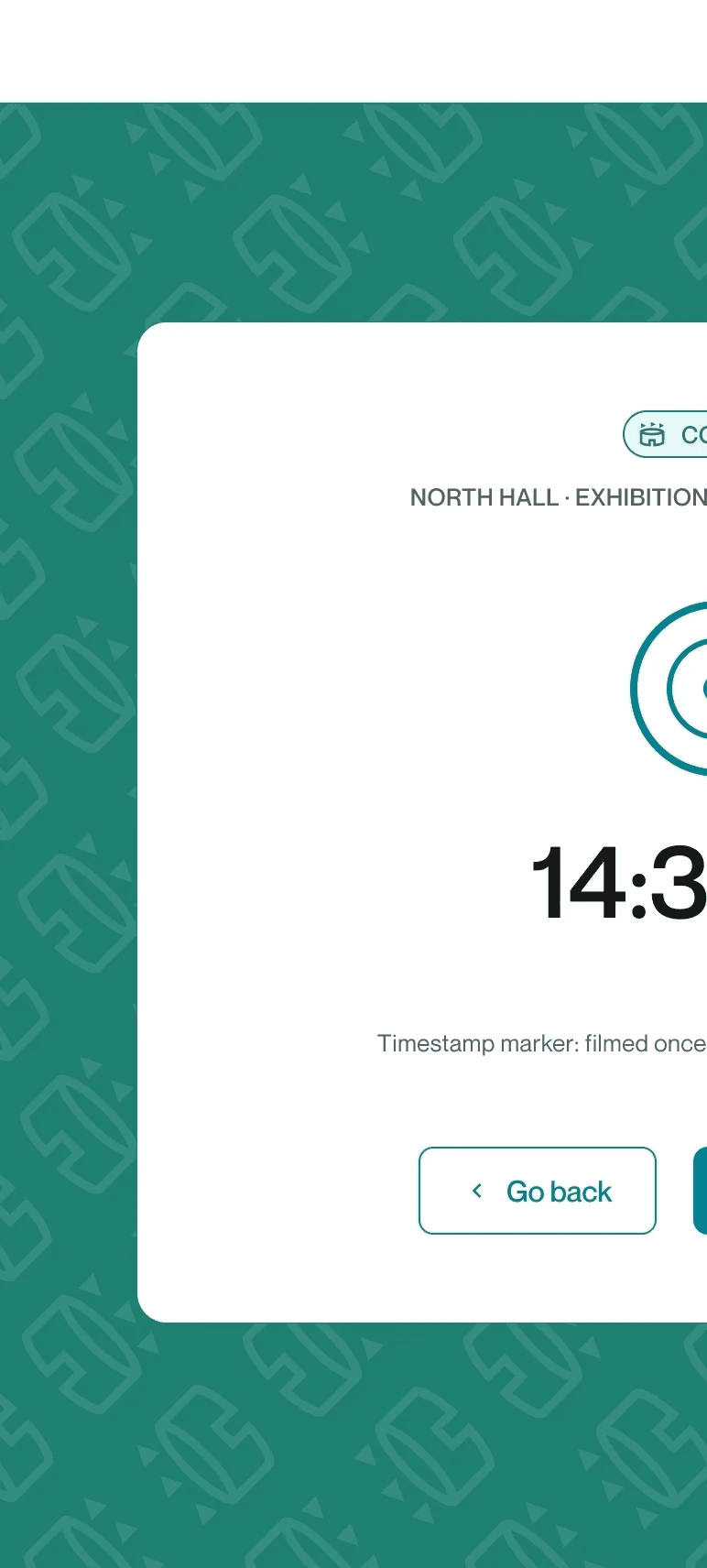
Sync Clocks: a single step
A timestamped marker is displayed on the stage manager's tablet: each camera operator briefly films it before starting their take, a gesture that synchronizes the clock and starts the recording. Following the live broadcast, the offset between this timestamp and that of each camera is calculated, automatically correcting the takes. This principle is inspired by the digital clapperboard, applied here to device synchronization.
Sync Clocks: a single step
A timestamped marker is displayed on the stage manager's tablet: each camera operator briefly films it before starting their take, a gesture that synchronizes the clock and starts the recording. Following the live broadcast, the offset between this timestamp and that of each camera is calculated, automatically correcting the takes. This principle is inspired by the digital clapperboard, applied here to device synchronization.
Feature
Sync clocks
A single gesture replaces manual synchronization and separate launches, resolving the loose connection between the camera take and the shot at its source.
Timestamp
Sync
Feature
Sync clocks
A single gesture replaces manual synchronization and separate launches, resolving the loose connection between the camera take and the shot at its source.
Timestamp
Sync
Isolated Component
Benchmark and clock
The clock displays seconds and remains continuously visible on the screen. The synchronization constraint is made explicit in the UI.
Isolated Component
Benchmark and clock
The clock displays seconds and remains continuously visible on the screen. The synchronization constraint is made explicit in the UI.
STAGE FLOW
1
Before going live, each camera operator briefly films the cue displayed on the stage manager's tablet
2
After the live broadcast: the timestamp of each camera is compared to the reference point
3
Adjustment: the calculated variance automatically realigns all measurements



STAGE FLOW
1
Before going live, each camera operator briefly films the cue displayed on the stage manager's tablet
2
After the live broadcast: the timestamp of each camera is compared to the reference point
3
Adjustment: the calculated variance automatically realigns all measurements
STAGE FLOW
1
Before going live, each camera operator briefly films the cue displayed on the stage manager's tablet
2
After the live broadcast: the timestamp of each camera is compared to the reference point
3
Adjustment: the calculated variance automatically realigns all measurements
Cover page: against forgetting
On set, every wide zone of the stage and every precise shot must be tracked individually. Rather than relying solely on the stage manager to memorize the progress, a zone map adds automatic completion badges.
The badge turns green as soon as all plans in an area are confirmed.
Cover page: against forgetting
On set, every wide zone of the stage and every precise shot must be tracked individually. Rather than relying solely on the stage manager to memorize the progress, a zone map adds automatic completion badges.
The badge turns green as soon as all plans in an area are confirmed.
Feature
Coverage map
3-level navigation: tabs by side of the boat, a clickable segmented schematic, and a list of POIs. This ensures the supervisor always maintains their orientation, even during active operations.
3-level navigation
Auto-complete
Feature
Coverage map
3-level navigation: tabs by side of the boat, a clickable segmented schematic, and a list of POIs. This ensures the supervisor always maintains their orientation, even during active operations.
3-level navigation
Auto-complete
Feature
Coverage map
3-level navigation: tabs by side of the boat, a clickable segmented schematic, and a list of POIs. This ensures the supervisor always maintains their orientation, even during active operations.
3-level navigation
Auto-complete
STAGE FLOW
1
Zones: Left Stage / Right Stage / Backstage tabs
2
Stage: segmented seating chart, selected area in green
3
Plans: list of plans to cover in the active zone
STAGE FLOW
1
Zones: Left Stage / Right Stage / Backstage tabs
2
Stage: segmented seating chart, selected area in green
3
Plans: list of plans to cover in the active zone


Isolated Component
Zone badges
4 states: green (all confirmed), red (missing plans), number (remaining plans), "Zone" (broad-level tracking).
Isolated Component
Zone badges
4 states: green (all confirmed), red (missing plans), number (remaining plans), "Zone" (broad-level tracking).


Zone vs. Level Granularity
A broad area and a precise plan do not require the same level of data entry precision: an estimated coverage percentage on one hand, a qualitative status on the other. This breakdown comes directly from professional feedback gathered during interviews.
Zone vs. Level Granularity
A broad area and a precise plan do not require the same level of data entry precision: an estimated coverage percentage on one hand, a qualitative status on the other. This breakdown comes directly from professional feedback gathered during interviews.
01
Zone Principle
Zone
Framing and audio are rated by the percentage of coverage deemed usable (0/25/50/100%), a field estimate recorded for the entire area, distinct from the automatic completion of badges.
01
Zone Principle
Zone
Framing and audio are rated by the percentage of coverage deemed usable (0/25/50/100%), a field estimate recorded for the entire area, distinct from the automatic completion of badges.
01
Zone Principle
Zone
Framing and audio are rated by the percentage of coverage deemed usable (0/25/50/100%), a field estimate recorded for the entire area, distinct from the automatic completion of badges.
01
Zone Principle
Zone
Framing and audio are rated by the percentage of coverage deemed usable (0/25/50/100%), a field estimate recorded for the entire area, distinct from the automatic completion of badges.
02
Plan Principle
Plan
Same qualification logic, but based on status (confirmed / to be revised / missing) rather than a percentage. A precise plan is qualified, not measured in surface area.
02
Plan Principle
Plan
Same qualification logic, but based on status (confirmed / to be revised / missing) rather than a percentage. A precise plan is qualified, not measured in surface area.
02
Plan Principle
Plan
Same qualification logic, but based on status (confirmed / to be revised / missing) rather than a percentage. A precise plan is qualified, not measured in surface area.
02
Plan Principle
Plan
Same qualification logic, but based on status (confirmed / to be revised / missing) rather than a percentage. A precise plan is qualified, not measured in surface area.
03
Professional feedback
Interviewed stage manager
"Percentages make sense for framing and sound. But for a specific shot, a category is enough."
03
Professional feedback
Interviewed stage manager
"Percentages make sense for framing and sound. But for a specific shot, a category is enough."
03
Professional feedback
Interviewed stage manager
"Percentages make sense for framing and sound. But for a specific shot, a category is enough."
03
Professional feedback
Interviewed stage manager
"Percentages make sense for framing and sound. But for a specific shot, a category is enough."


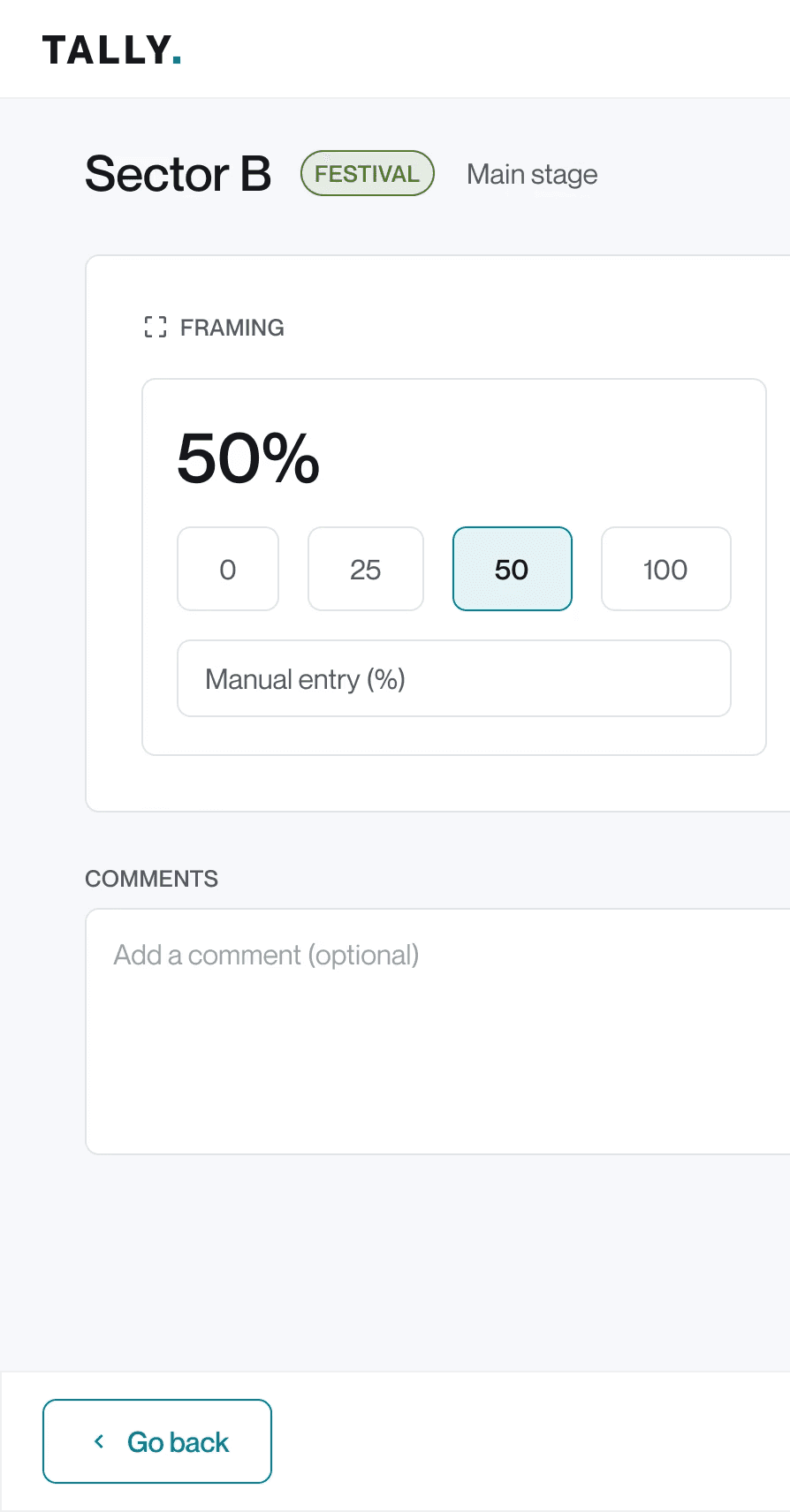


Capture and replay: a single screen
Rather than featuring two separate interfaces, Capture and Resume are combined on the same screen, distinguished by a clickable button. In Capture mode, a single state is sufficient. In Resume mode, a BEFORE/AFTER toggle compares the initial plan with the result, since the same plan may require confirmation and then correction within the same live session.
Duplicating the interface would have cost time that the live broadcast did not allow.
Capture and replay: a single screen
Rather than featuring two separate interfaces, Capture and Resume are combined on the same screen, distinguished by a clickable button. In Capture mode, a single state is sufficient. In Resume mode, a BEFORE/AFTER toggle compares the initial plan with the result, since the same plan may require confirmation and then correction within the same live session.
Duplicating the interface would have cost time that the live broadcast did not allow.
Feature
Capture vs. Recovery
The same input screen is used for both cases, distinguished by a clickable button. No duplicated interface means no wasted time on site.
Button type
Toggle BEFORE/AFTER
Feature
Capture vs. Recovery
The same input screen is used for both cases, distinguished by a clickable button. No duplicated interface means no wasted time on site.
Button type
Toggle BEFORE/AFTER
STAGE FLOW
1
Initial choice: modal on first tap of a plan, Capture or Resume
2
Capture: a single state, no toggle
3
Review: toggle BEFORE (initial plan) / AFTER (corrected result)
STAGE FLOW
1
Initial choice: modal on first tap of a plan, Capture or Resume
2
Capture: a single state, no toggle
3
Review: toggle BEFORE (initial plan) / AFTER (corrected result)


Isolated Component
Select Type
Modal on plan tap: Capture or Resume, selection directly launches the entry. A type button at the top of the screen allows switching modes without losing data in case of error.
Isolated Component
Select Type
Modal on plan tap: Capture or Resume, selection directly launches the entry. A type button at the top of the screen allows switching modes without losing data in case of error.
Isolated Component
Before/after check
Toggle visible only in Backup mode, secondary color. Switches between the initial plan and the result without losing the data of the other state.
Isolated Component
Before/after check
Toggle visible only in Backup mode, secondary color. Switches between the initial plan and the result without losing the data of the other state.

What was delivered
14 designed screens cover the active journey: preparation, synchronization, field navigation, data entry, and closure. Two post-live screens, covering footage upload and the final coverage summary, remain specified but not designed in V1.
What was delivered
14 designed screens cover the active journey: preparation, synchronization, field navigation, data entry, and closure. Two post-live screens, covering footage upload and the final coverage summary, remain specified but not designed in V1.

Reflection
Reflection
What I would have done differently
With broader field access, the same validation discipline would apply on a larger scale. One-on-one interviews produced more direct responses than group framing: a format to be generalized, not just about "doing more research".
On the product side, two areas remain open: pre-assigning the Capture/Resume mode during configuration, and a dedicated screen to add a forgotten plan during a live broadcast.
What I would have done differently
With broader field access, the same validation discipline would apply on a larger scale. One-on-one interviews produced more direct responses than group framing: a format to be generalized, not just about "doing more research".
On the product side, two areas remain open: pre-assigning the Capture/Resume mode during configuration, and a dedicated screen to add a forgotten plan during a live broadcast.