
PROJECT - 02
Product Design · Submarine Inspection
Subtrack
Coordinate a real-time underwater inspection
ROLE
Solo · E2E
TEAM
PO · PM · Dev
DURATION
~2 months
DELIVERABLE
Ready
TYPE
Real-time terrain
The diver had to carry a tablet underwater. One conversation was enough to change the target.


PROJECT - 02
Product Design · Submarine Inspection
Subtrack
Coordinate a real-time underwater inspection
ROLE
Solo · E2E
TEAM
PO · PM · Dev
DURATION
~2 months
TYPE
Human-AI Interface
DELIVERABLE
Ready
The diver had to carry a tablet underwater. One conversation was enough to change the target.
Business context
Business context
In-water hull inspection by diving
Biofouling and coating condition dictate a shipowner's maintenance decisions. A specialist underwater inspection provider delivers a report based on these parameters.


In-water hull inspection by diving
Biofouling and coating condition dictate a shipowner's maintenance decisions. A specialist underwater inspection provider delivers a report based on these parameters.
In-water hull inspection by diving
Biofouling and coating condition dictate a shipowner's maintenance decisions. A specialist underwater inspection provider delivers a report based on these parameters.
In-water hull inspection by diving
Biofouling and coating condition dictate a shipowner's maintenance decisions. A specialist underwater inspection provider delivers a report based on these parameters.
Issue
Issue
"The link between the image and the area is approximate."
What the supervisor was experiencing
During an operation, the supervisor documents fouling and coating while remotely guiding a diver monitored via camera and audio. They simultaneously manage the video feed, continuous audio, and coordination with the vessel crew, with a Word document as their only input interface. In the field, positions are signaled using hand gestures captured on camera (e.g., "SC" for seachest, the hull water intake) or physical signs—an extra burden for a connection that remains approximate. The final association between the photo and the specific area is then reconstructed from memory immediately following the operation.
"The link between the image and the area is approximate."
What the supervisor was experiencing
During an operation, the supervisor documents fouling and coating while remotely guiding a diver monitored via camera and audio. They simultaneously manage the video feed, continuous audio, and coordination with the vessel crew, with a Word document as their only input interface. In the field, positions are signaled using hand gestures captured on camera (e.g., "SC" for seachest, the hull water intake) or physical signs—an extra burden for a connection that remains approximate. The final association between the photo and the specific area is then reconstructed from memory immediately following the operation.
"The link between the image and the area is approximate."
What the supervisor was experiencing
The analyst arrived at a raw gallery: no sequences, no distinction between verified and untreated, no indicators. Errors were concentrated on boundary conditions (micro-fouling, degraded coating). Correcting a misclassified image meant searching blindly.
Approach
Approach
Two interview rounds, one methodology
Two interviews with the same field supervisor structure the validation of the initial hypothesis: a first framing interview, and a second post-wireframe confirmation interview. This second interview is held one-on-one, with no mockups on screen, to limit anchoring bias. An informal review is also conducted by a team UX designer not assigned to the project, due to the lack of a formal peer review process.
First project. No established process.
Two interviews with the same field supervisor structure the validation of the initial hypothesis: a first framing interview, and a second post-wireframe confirmation interview. This second interview is held one-on-one, with no mockups on screen, to limit anchoring bias. An informal review is also conducted by a team UX designer not assigned to the project, due to the lack of a formal peer review process.
Two interview rounds, one methodology
Two interviews with the same field supervisor structure the validation of the initial hypothesis: a first framing interview, and a second post-wireframe confirmation interview. This second interview is held one-on-one, with no mockups on screen, to limit anchoring bias. An informal review is also conducted by a team UX designer not assigned to the project, due to the lack of a formal peer review process.
01
Initial conviction
From the very start of project scoping, the product manager is convinced that the diver must be equipped with a waterproof tablet to document the inspection live, underwater. The idea seems logical: they are the one observing the hull up close, even before the supervisor who guides them remotely. On paper, giving them the data entry tool appears to be the most direct solution.
Obvious, but only on the surface.
01
Initial conviction
The product manager is convinced that the diver should be equipped with a waterproof tablet. This seems logical on the surface, since they are the one directly observing the hull.
Obvious, but only on the surface.
01
Initial conviction
From the very start of project scoping, the product manager is convinced that the diver must be equipped with a waterproof tablet to document the inspection live, underwater. The idea seems logical: they are the one observing the hull up close, even before the supervisor who guides them remotely. On paper, giving them the data entry tool appears to be the most direct solution.
Obvious, but only on the surface.
01
Initial conviction
From the very start of project scoping, the product manager is convinced that the diver must be equipped with a waterproof tablet to document the inspection live, underwater. The idea seems logical: they are the one observing the hull up close, even before the supervisor who guides them remotely. On paper, giving them the data entry tool appears to be the most direct solution.
Obvious, but only on the surface.
02
Blocking
Before designing a single screen, consulting a real user is a non-negotiable requirement, even in the face of product intuition that seems reasonable. The product owner supports this position: the risk is not losing time, but designing for the wrong person. The decision is made to suspend all technical choices until the first field interview.
Better to verify than to guess.
02
Blocking
Before designing a single screen, consulting a real user is a non-negotiable requirement, even in the face of product intuition that seems reasonable. The product owner supports this position: the risk is not losing time, but designing for the wrong person. The decision is made to suspend all technical choices until the first field interview.
Better to verify than to guess.
02
Blocking
Before designing a single screen, consulting a real user is a non-negotiable requirement, even in the face of product intuition that seems reasonable. The product owner supports this position: the risk is not losing time, but designing for the wrong person. The decision is made to suspend all technical choices until the first field interview.
Better to verify than to guess.
03
Verbatim
During the first interview, the product manager is present and hears the supervisor's response directly: underwater, the diver's hands are already occupied with thick gloves, and their mind is focused on following audio instructions. Adding a data entry task on top of everything else would be unmanageable. The feedback is direct and immediate, not reconstructed after the fact.
"Adding another task to their workload would be unmanageable."
03
Verbatim
During the first interview, the product manager is present and hears the supervisor's response directly: underwater, the diver's hands are already occupied with thick gloves, and their mind is focused on following audio instructions. Adding a data entry task on top of everything else would be unmanageable. The feedback is direct and immediate, not reconstructed after the fact.
"Adding another task to their workload would be unmanageable."
03
Verbatim
During the first interview, the product manager is present and hears the supervisor's response directly: underwater, the diver's hands are already occupied with thick gloves, and their mind is focused on following audio instructions. Adding a data entry task on top of everything else would be unmanageable. The feedback is direct and immediate, not reconstructed after the fact.
"Adding another task to their workload would be unmanageable."
04
The pivot
The project shifted its target before a single screen even existed. It was no longer the diver who needed to be equipped, but the supervisor: the person guiding the operation remotely and carrying, alone, the entire documentation burden. The rest of the project was designed for this person, and this person alone.
The supervisor, the true target.
04
The pivot
The project shifted its target before a single screen even existed. It was no longer the diver who needed to be equipped, but the supervisor: the person guiding the operation remotely and carrying, alone, the entire documentation burden. The rest of the project was designed for this person, and this person alone.
The supervisor, the true target.
04
The pivot
The project shifted its target before a single screen even existed. It was no longer the diver who needed to be equipped, but the supervisor: the person guiding the operation remotely and carrying, alone, the entire documentation burden. The rest of the project was designed for this person, and this person alone.
The supervisor, the true target.
Decisions
Decisions
The journey, decision by decision
Before SUBTRACK, preparing an operation meant listing areas and points of interest to cover in a Word document: long, tedious, unintuitive, and requiring a complete proofread to verify what was entered. The Execution screen uses the same visual approach as Target POI/ROI in the field (sides, zones, POIs): everything selected during preparation is immediately recognizable once on the boat.
Less mental load during the operation, as everything has already been decided beforehand.
The journey, decision by decision
Before SUBTRACK, preparing an operation meant listing areas and points of interest to cover in a Word document: long, tedious, unintuitive, and requiring a complete proofread to verify what was entered. The Execution screen uses the same visual approach as Target POI/ROI in the field (sides, zones, POIs): everything selected during preparation is immediately recognizable once on the boat.
Less mental load during the operation, as everything has already been decided beforehand.
Feature
Sticky Box
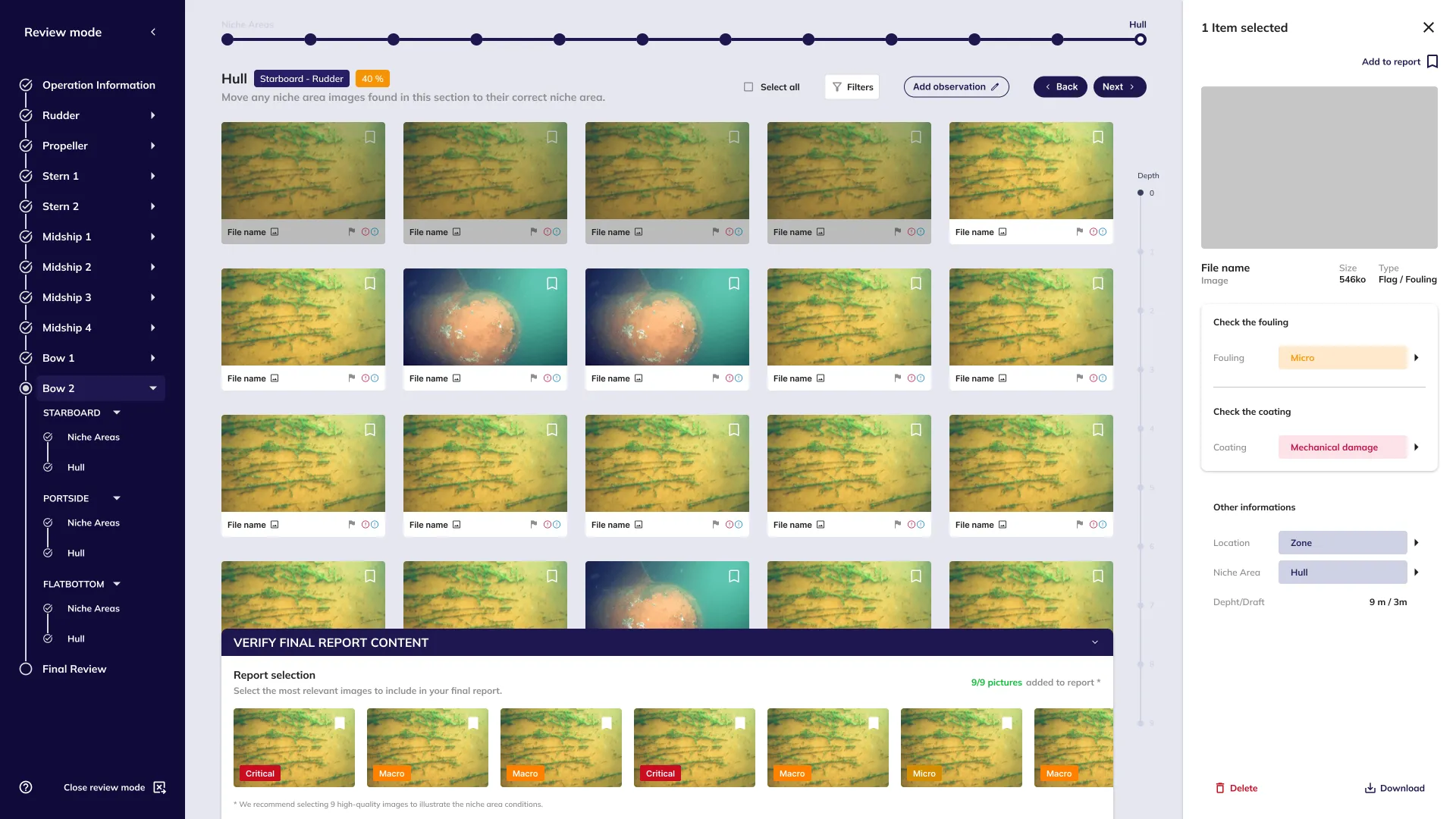
A panel at the bottom of the gallery allows you to preview the items that will be included in the final report.
Chip 1
Chip 2
Isolated Component
Sticky Box open
Qualification of the inspection area and/or selection of images to be included in the report.
Feature
Operation Setup
3-step wizard and review screen prior to launch. The Execution step mirrors the visual logic of the field screen: pre-selecting zones and POIs replaces the Word document and sets up a familiar reference point once on site.
Tablet-first
Wizard
Feature
Operation Setup
3-step wizard and review screen prior to launch. The Execution step mirrors the visual logic of the field screen: pre-selecting zones and POIs replaces the Word document and sets up a familiar reference point once on site.
Tablet-first
Wizard
Feature
Operation Setup
3-step wizard and review screen prior to launch. The Execution step mirrors the visual logic of the field screen: pre-selecting zones and POIs replaces the Word document and sets up a familiar reference point once on site.
Tablet-first
Wizard
STAGE FLOW
1
Context: Vessel · Location · Client
2
Operation: Type of operation · Details · Team
3
Execution: Select zones and POIs to inspect
4
Review: Summary, return to editing is possible
STAGE FLOW
1
Context: Vessel · Location · Client
2
Operation: Type of operation · Details · Team
3
Execution: Select zones and POIs to inspect
4
Review: Summary, return to editing is possible
STAGE FLOW
1
Context: Vessel · Location · Client
2
Operation: Type of operation · Details · Team
3
Execution: Select zones and POIs to inspect
4
Review: Summary, return to editing is possible
Isolated Component
Sticky Box open
Qualification of the inspection area and/or selection of images to be included in the report.

3


1
2
4
STAGE FLOW
1
Select: icon on the image, "add to report" button in the sidebar, and sticky box
2
Qualify: images of group-qualified zones
3
Verify: recommended number of images
OPTIONS CONSIDERED AND REJECTED
- Persistent sidebar: cognitive overload confirmed during testing - Tabs: excessive navigation that could mislead users
Digital Sync: a single step to synchronize and start
A QR code scanned by the diver's camera before the dive synchronizes the clocks and starts the recording simultaneously. The photo of the QR code carries the camera's timestamp, while the QR code itself encodes that of the tablet. Once the two are compared after the operation, the exact offset between both clocks is calculated, correcting all camera timestamps. The principle is inspired by the movie clapperboard, applied to device synchronization rather than image alignment.
The Sticky Box: seamless integration without clutter
A QR code scanned by the diver's camera before the dive synchronizes the clocks and starts the recording simultaneously. The photo of the QR code carries the camera's timestamp, while the QR code itself encodes that of the tablet. Once the two are compared after the operation, the exact offset between both clocks is calculated, correcting all camera timestamps. The principle is inspired by the movie clapperboard, applied to device synchronization rather than image alignment.
Digital Sync: a single step to synchronize and start
A QR code scanned by the diver's camera before the dive synchronizes the clocks and starts the recording simultaneously. The photo of the QR code carries the camera's timestamp, while the QR code itself encodes that of the tablet. Once the two are compared after the operation, the exact offset between both clocks is calculated, correcting all camera timestamps. The principle is inspired by the movie clapperboard, applied to device synchronization rather than image alignment.
Feature
Sticky Box
A panel at the bottom of the gallery allows you to preview the items that will be included in the final report.
Chip 1
Chip 2
Isolated Component
Sticky Box open
Qualification of the inspection area and/or selection of images to be included in the report.
Feature
Digital Sync
QR auto-refresh 25s, millisecond clock, and Start Recording button on the same screen (directly resolves the approximate image/zone link area issue).
QR code
Clock synchronization
Feature
Digital Sync
QR auto-refresh 25s, millisecond clock, and Start Recording button on the same screen (directly resolves the approximate image/zone link area issue).
QR code
Clock synchronization
Isolated Component
QR code and clock
Auto-refresh every 25 seconds, with the clock displayed down to millisecond precision. The synchronization constraint is made visible in the UI.
STAGE FLOW
1
Before the dive: the diver photographs the QR code displayed on the tablet
2
Post-operation: comparison of camera timestamp and QR timestamp
3
Correction: calculated offset, all camera timestamps automatically realigned
STAGE FLOW
1
Before the dive: the diver photographs the QR code displayed on the tablet
2
Post-operation: comparison of camera timestamp and QR timestamp
3
Correction: calculated offset, all camera timestamps automatically realigned
Isolated Component
Sticky Box open
Qualification of the inspection area and/or selection of images to be included in the report.


STAGE FLOW
1
Select: icon on the image, "add to report" button in the sidebar, and sticky box
2
Qualify: images of group-qualified zones
3
Verify: recommended number of images
OPTIONS CONSIDERED AND REJECTED
- Persistent sidebar: cognitive overload confirmed during testing - Tabs: excessive navigation that could mislead users
Target POI/ROI: the map that replaces memory
In the field, every broad area (ROI) and precise point (POI) must be tracked individually. Rather than relying on the supervisor to memorize the coverage alone, a zone map adds automatic completion badges.
The badge turns green as soon as all points in an area are addressed, with no manual action required.
Target POI/ROI: the map that replaces memory
In the field, every broad area (ROI) and precise point (POI) must be tracked individually. Rather than relying on the supervisor to memorize the coverage alone, a zone map adds automatic completion badges.
The badge turns green as soon as all points in an area are addressed, with no manual action required.
Feature
Target POI/ROI
3-level navigation: tabs by side of the boat, a clickable segmented schematic, and a list of POIs. This ensures the supervisor always maintains their orientation, even during active operations.
3-level navigation
Auto-complete
Feature
Target POI/ROI
3-level navigation: tabs by side of the boat, a clickable segmented schematic, and a list of POIs. This ensures the supervisor always maintains their orientation, even during active operations.
3-level navigation
Auto-complete
STAGE FLOW
1
Sides: Starboard / Portside / Flatbottom tabs
2
Zones: segmented boat diagram, selected zone in green
3
POIs: list of points to cover in the active zone
STAGE FLOW
1
Sides: Starboard / Portside / Flatbottom tabs
2
Zones: segmented boat diagram, selected zone in green
3
POIs: list of points to cover in the active zone
Feature
Unreviewed Changes
Three mechanisms: percentage-based progress, real-time indicators, and an automatic modal for unreviewed changes.
Preventive
Real-time
Isolated Component
Unreviewed Changes Modal
Triggered if zones are unread or modified: helps ensure nothing is missed.
OPTIONS CONSIDERED AND REJECTED
- Undo button: technically complex for a marginal gain (Shape Up) - Decision: address the root cause (visibility) rather than the symptom (cancellation) - Dual panel documented in the user stories as the next iteration, intentionally descoped
STAGE FLOW
1
Review in progress: track real-time updates
2
Navigation: the analyst leaves an area, and badges indicate unreviewed zones
3
Modal triggered: at the end of the journey, list of affected zones


Isolated Component
Zone badges
4 states: ✓ green (all verified), ✗ red (missing data), number (remaining POIs), "Zone" (ROI-level observation). Auto-completion, no manual validation.
Isolated Component
Zone badges
4 states: ✓ green (all verified), ✗ red (missing data), number (remaining POIs), "Zone" (ROI-level observation). Auto-completion, no manual validation.


Zone vs POI Granularity
A broad area and a specific point do not require the same input precision: an exact percentage on one hand, and a qualitative category on the other. This breakdown comes directly from a business term gathered during an interview.
Zone vs POI Granularity
A broad area and a specific point do not require the same input precision: an exact percentage on one hand, and a qualitative category on the other. This breakdown comes directly from a business term gathered during an interview.
01
ROI Principle
Region (ROI)
Percent-rated fouling and coating (0/25/50/100%), applicable to a large surface area.
01
ROI Principle
Region (ROI)
Percent-rated fouling and coating (0/25/50/100%), applicable to a large surface area.
01
ROI Principle
Region (ROI)
Percent-rated fouling and coating (0/25/50/100%), applicable to a large surface area.
01
ROI Principle
Region (ROI)
Percent-rated fouling and coating (0/25/50/100%), applicable to a large surface area.
02
POI Principle
Point of Interest (POI)
Same categories, without percentages. A specific point qualifies; it is not measured in surface area.
02
POI Principle
Point of Interest (POI)
Same categories, without percentages. A specific point qualifies; it is not measured in surface area.
02
POI Principle
Point of Interest (POI)
Same categories, without percentages. A specific point qualifies; it is not measured in surface area.
02
POI Principle
Point of Interest (POI)
Same categories, without percentages. A specific point qualifies; it is not measured in surface area.
03
Professional feedback
Interviewed supervisor:
"Percentages make sense for fouling and coating. But for a specific damage, a category is enough."
03
Professional feedback
Interviewed supervisor:
"Percentages make sense for fouling and coating. But for a specific damage, a category is enough."
03
Professional feedback
Interviewed supervisor:
"Percentages make sense for fouling and coating. But for a specific damage, a category is enough."
03
Professional feedback
Interviewed supervisor:
"Percentages make sense for fouling and coating. But for a specific damage, a category is enough."


Inspection and maintenance: one toggle, not two interfaces
Rather than two separate interfaces, Inspection and Maintenance come together on the same entry screen, distinguished by a clickable toggle button. In Inspection, a single status is sufficient. In Maintenance, a BEFORE/AFTER toggle is added to capture the status before and after the intervention, since a single point may require observation and then intervention within the same operation.
Duplicating the interface would have cost time that the schedule did not allow.
Inspection and maintenance: one toggle, not two interfaces
Rather than two separate interfaces, Inspection and Maintenance come together on the same entry screen, distinguished by a clickable toggle button. In Inspection, a single status is sufficient. In Maintenance, a BEFORE/AFTER toggle is added to capture the status before and after the intervention, since a single point may require observation and then intervention within the same operation.
Duplicating the interface would have cost time that the schedule did not allow.
Feature
Inspection vs. Maintenance
The same entry screen is used for both operation types, distinguished by a clickable type button. The BEFORE/AFTER toggle only appears in Maintenance mode, to capture the state before and after the intervention.
Toggle
Unified entry
Feature
Inspection vs. Maintenance
The same entry screen is used for both operation types, distinguished by a clickable type button. The BEFORE/AFTER toggle only appears in Maintenance mode, to capture the state before and after the intervention.
Toggle
Unified entry
STAGE FLOW
1
Initial choice: POI-todo modal, Inspection, or Maintenance, upon first click on a POI
2
Inspection: single state, no toggle
3
Maintenance: toggle before intervention and after intervention
STAGE FLOW
1
Initial choice: POI-todo modal, Inspection, or Maintenance, upon first click on a POI
2
Inspection: single state, no toggle
3
Maintenance: toggle before intervention and after intervention


Isolated Component
Select the transaction type
Modal on POI click: 2 buttons, Inspection or Maintenance. Selection directly starts the log. In case of error, a clickable button at the top of the entry screen allows switching modes without losing data.
Isolated Component
Select the transaction type
Modal on POI click: 2 buttons, Inspection or Maintenance. Selection directly starts the log. In case of error, a clickable button at the top of the entry screen allows switching modes without losing data.
Isolated Component
Maintenance Before / After
Active toggle in the secondary color. Switches between the pre-intervention state and the result, without losing the data of the other state.
Isolated Component
Maintenance Before / After
Active toggle in the secondary color. Switches between the pre-intervention state and the result, without losing the data of the other state.
Feature
Correction sidebar
Selected images, color-coded fouling/coating dropdown. Direct correction from the gallery, without a dedicated page.
Correction
Classification
Isolated Component
Dropdown
Color statuses (fouling and coating): same visual logic as the filters and the classification system.

STAGE FLOW
1
Select: images to correct in the gallery
2
Fix: dropdown fouling/coating, color codes, validation
3
Relocate: if the image belongs to another zone (Relocation)
BEFORE THE REDESIGN
- No color coding in the dropdown (text selection only) - No indications regarding the actions to be taken
End-of-operation: summary before closing
A summary of completed and missing fields is displayed before any final operation validation: a direct response to the contractual risk of an overlooked area. Clicking "End Operation" is never an immediate or irreversible action: it first opens this summary, allowing the supervisor to see exactly what has been covered before confirming. Once validated, the operation returns to the dashboard, pending synchronization.
End-of-operation: summary before closing
A summary of completed and missing fields is displayed before any final operation validation: a direct response to the contractual risk of an overlooked area. Clicking "End Operation" is never an immediate or irreversible action: it first opens this summary, allowing the supervisor to see exactly what has been covered before confirming. Once validated, the operation returns to the dashboard, pending synchronization.
Feature
End Operation
Closure of the operation with verification before validation. The supervisor sees exactly what has been covered, ensuring no accidental closures.
Confirmation
Awaiting Sync Status
Feature
End Operation
Closure of the operation with verification before validation. The supervisor sees exactly what has been covered, ensuring no accidental closures.
Confirmation
Awaiting Sync Status
STAGE FLOW
1
Clicking "End Operation" opens the summary without closing it immediately
2
Summary: completed vs missing zones displayed
3
Confirmation: returning to dashboard, status Awaiting Sync
STAGE FLOW
1
Clicking "End Operation" opens the summary without closing it immediately
2
Summary: completed vs missing zones displayed
3
Confirmation: returning to dashboard, status Awaiting Sync
Isolated Component
End Operation
Confirmation dialog and summary of completed versus missing areas before validating the closure.
Isolated Component
End Operation
Confirmation dialog and summary of completed versus missing areas before validating the closure.
Isolated Component
Awaiting Sync Status
Once confirmed, the operation reappears in "Latest Operations" with the status Awaiting Sync, pending the upload of the diver's images.
Isolated Component
Awaiting Sync Status
Once confirmed, the operation reappears in "Latest Operations" with the status Awaiting Sync, pending the upload of the diver's images.
STAGE FLOW
1
Clicking "End Operation" opens the summary without closing it immediately
2
Summary: completed vs missing zones displayed
3
Confirmation: returning to dashboard, status Awaiting Sync
STAGE FLOW
1
Clicking "End Operation" opens the summary without closing it immediately
2
Summary: completed vs missing zones displayed
3
Confirmation: returning to dashboard, status Awaiting Sync
Feature
Correction sidebar
Selected images, color-coded fouling/coating dropdown. Direct correction from the gallery, without a dedicated page.
Correction
Classification
Isolated Component
Dropdown
Color statuses (fouling and coating): same visual logic as the filters and the classification system.
STAGE FLOW
1
Select: images to correct in the gallery
2
Fix: dropdown fouling/coating, color codes, validation
3
Relocate: if the image belongs to another zone (Relocation)
BEFORE THE REDESIGN
- No color coding in the dropdown (text selection only) - No indications regarding the actions to be taken
What was delivered
14 designed screens cover the active user journey: preparation, sync, field navigation, data entry, and closing. Two post-operation screens, image upload and the final report summary, remain specified but not designed in V1.
What was delivered
14 designed screens cover the active user journey: preparation, sync, field navigation, data entry, and closing. Two post-operation screens, image upload and the final report summary, remain specified but not designed in V1.
Results
Results
"It brings a fresh and modern touch compared to the existing design system."
Product Owner, Final Presentation
The interface was well received during the final presentation, as confirmed by the product owner's feedback. The cloud lead raised a specific question regarding clock synchronization, showing active engagement rather than mere politeness. Additionally, a UX designer who was not involved in the project offered unreservedly positive feedback. However, the strongest indicator of success lies elsewhere: having successfully pivoted the product's target before a single screen was ever created.
The interviewed supervisor, without having seen the final mockups, verbally validated the QR code, the freedom of navigation, and the double alert for missed zones. The deliverable, jointly validated by the product owner, the product manager, and the development team, was set to be deployed to production.
"It brings a fresh and modern touch compared to the existing design system."
Product Owner, Final Presentation
The interface was well received during the final presentation, as confirmed by the product owner's feedback. The cloud lead raised a specific question regarding clock synchronization, showing active engagement rather than mere politeness. Additionally, a UX designer who was not involved in the project offered unreservedly positive feedback. However, the strongest indicator of success lies elsewhere: having successfully pivoted the product's target before a single screen was ever created.
The interviewed supervisor, without having seen the final mockups, verbally validated the QR code, the freedom of navigation, and the double alert for missed zones. The deliverable, jointly validated by the product owner, the product manager, and the development team, was set to be deployed to production.
"It brings a fresh and modern touch compared to the existing design system."
Product Owner, Final Presentation
The interface was well received during the final presentation, as confirmed by the product owner's feedback. The cloud lead raised a specific question regarding clock synchronization, showing active engagement rather than mere politeness. Additionally, a UX designer who was not involved in the project offered unreservedly positive feedback. However, the strongest indicator of success lies elsewhere: having successfully pivoted the product's target before a single screen was ever created.
The interviewed supervisor, without having seen the final mockups, verbally validated the QR code, the freedom of navigation, and the double alert for missed zones. The deliverable, jointly validated by the product owner, the product manager, and the development team, was set to be deployed to production.
15-20%
Reduction of reporting errors
What structured data entry enables
Before SUBTRACK, supervisors recorded their observations in unstructured Word documents without any validation process. Industry-wide, utilizing structured, field-guided data entry typically reduces these types of reporting errors by 15% to 20% compared to free-form text.
The link is established at the time of upload, without any subsequent reconstruction.
15-20%
Reduction of reporting errors
Structured navigation, sequential processing; saves time
Before SUBTRACK, supervisors recorded their observations in unstructured Word documents without any validation process. Industry-wide, utilizing structured, field-guided data entry typically reduces these types of reporting errors by 15% to 20% compared to free-form text.
The link is established at the time of upload, without any subsequent reconstruction.
15-20%
Reduction of reporting errors
What structured data entry enables
Before SUBTRACK, supervisors recorded their observations in unstructured Word documents without any validation process. Industry-wide, utilizing structured, field-guided data entry typically reduces these types of reporting errors by 15% to 20% compared to free-form text.
The link is established at the time of upload, without any subsequent reconstruction.
Reflection
Reflection
What would change, under the same constraints
With broader field access, the same validation discipline would apply at a larger scale. One-on-one interviews produced more direct responses than group framing: a format to be generalized, not just "doing more research."
On the product side, two areas remain open: the pre-assignment of the intervention type per point during configuration, and a dedicated screen for adding a missed point during an operation.
What would change, under the same constraints
With broader field access, the same validation discipline would apply at a larger scale. One-on-one interviews produced more direct responses than group framing: a format to be generalized, not just "doing more research."
On the product side, two areas remain open: the pre-assignment of the intervention type per point during configuration, and a dedicated screen for adding a missed point during an operation.